Badge
Badges are small, dynamic components used to convey numerical information or status updates. They’re often attached to other elements, like icons or buttons, to draw attention to notifications, counts, or statuses.

Badges are typically used to display notifications or counts, helping users quickly identify new information or status updates. Common scenarios include:
- Notification counts: Display the number of unread messages, tasks, or alerts.
- Status indication: Show whether something is active, completed, or requires attention.
- Activity counts: Indicate the number of actions, files, or items related to an element.

Primary: Use for high-priority badges or to match the primary theme. Secondary: Suitable for less prominent badges or to match the secondary theme.
Border
Section titled “Border”
On: Badge is displayed with a defined border.
Off: Badge is displayed without a border.
Adding a border around the badge enhances its visibility and distinction from the background.
Show Badge
Section titled “Show Badge”The Show Badge property allows the badge to be turned on or off. Note: Dev API prop is hide. The badge will be displayed when hide is set to false and be hidden when set to true.
Placement
Section titled “Placement”
Badges can be positioned in four different places relative to their parent component: top right, top left, bottom right, and bottom left. Top-right is the most common placement and is best for notifications, message counts, and alerts. Other positions may be used for suitable scenarios.
Digit Length
Section titled “Digit Length”
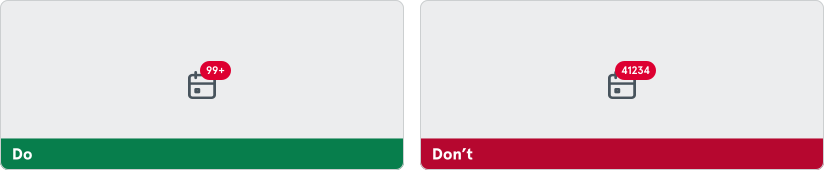
To prevent overwhelming users, it is suggested to limit the number of characters displayed in the badge to three. If the numerical value exceeds 99, displaying “99+” helps maintain readability and prevents the badge from becoming cluttered or difficult to interpret.