
Horizontal Bar Charts
How to use this page
Section titled “How to use this page”All examples and samples on this page serve as a baseline. Start with the styles available here to maintain consistency. You may add additional complexity if needed, but be cognizant of users’ mental load, and use a different visualization if these charts aren’t the best fit.
Horizontal Bar Charts
Section titled “Horizontal Bar Charts”Horizontal bar charts are used to compare numerical values, such as integers or percentages, by representing each variable with the length of a horizontal bar. They are particularly useful for highlighting variations across categories, such as a restaurant’s expenses by type or item sales per channel over time.
Variations
Section titled “Variations”- Basic Horizontal Bar Chart
- Grouped Horizontal Bar Chart
- Stacked Horizontal Bar Chart
Labels and legends should be included to clarify specific data points. Ensure horizontal alignment of elements supports readability, especially for categories with long names.
Horizontal Bar Chart Guidelines
Section titled “Horizontal Bar Chart Guidelines”When creating horizontal bar charts, consistency is key. Use the styles provided as a starting point, and keep the design as simple as possible to reduce cognitive load for users. If additional complexity is required, ensure it serves the user’s needs without overwhelming them.
Choosing the Right Chart Type
Section titled “Choosing the Right Chart Type”Select the chart type based on your data and the user’s goals:
- Basic Horizontal Bar Chart: Best for categorical data.
- Grouped Horizontal Bar Chart: Ideal for comparing multiple variables across categories.
- Stacked Horizontal Bar Chart: Useful when showing the total sum of variables within categories.
If your visualization needs go beyond these chart types, use the existing styles as a baseline.
Basic Horizontal Bar Chart
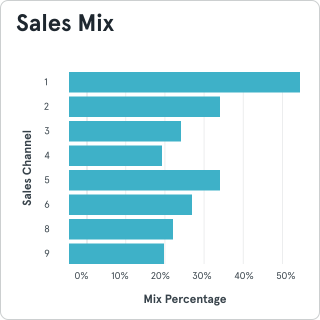
Section titled “Basic Horizontal Bar Chart”Basic Horizontal Bar Charts display categorical data. They are particularly effective for data with longer labels or when time is not a factor. Keep the chart simple and include clear labels. Ensure bars are evenly spaced and aligned to the left for readability.
Grouped Horizontal Bar Chart
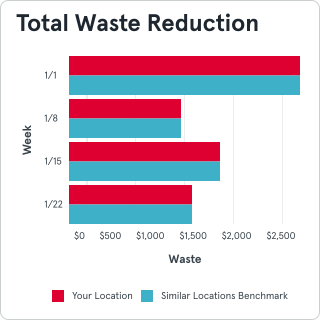
Section titled “Grouped Horizontal Bar Chart”Grouped Horizontal Bar Charts compare multiple variables within categories. Bars are grouped by category, making it easy to compare values within the same group.
- Use no more than three bars per group to ensure clarity.
- For comparing group totals across multiple variables, consider a Stacked Horizontal Bar Chart instead.
- Align group labels consistently to avoid confusion.
Stacked Horizontal Bar Chart
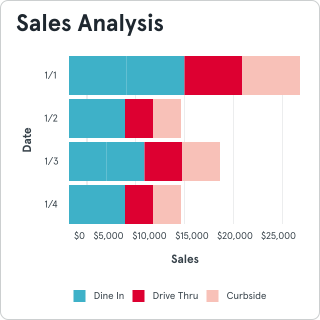
Section titled “Stacked Horizontal Bar Chart”Stacked Horizontal Bar Charts display the sum of multiple variables while showing the breakdown of each category. This type is best for highlighting group totals.
- Use a legend to clearly identify each segment’s color.
- Be aware that comparing subcategories within groups can be more difficult with this chart type.
- Ensure colors have sufficient contrast for clarity.
Additional Tips
Section titled “Additional Tips”- Always include a legend to explain colors and symbols.
- Label axes clearly and use a logical scale.
- Avoid excessive data density—prioritize readability and clarity.
- Use tooltips or annotations to provide additional context when necessary.
- Ensure the horizontal format is optimized for the available screen or print area.
- Align category labels to the left or right of the chart for maximum readability, especially when dealing with long text.
General Chart Pitfalls
Section titled “General Chart Pitfalls”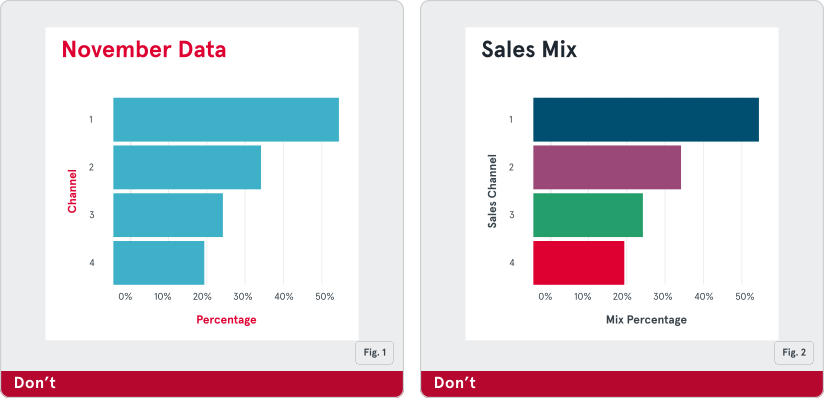
Fig. 1: Ensure your chart has clear, concise labels and a descriptive title.
Fig. 2: Do not use different colors to show the same metric on a bar chart (unless an additional metric is indicated and visible in a legend).
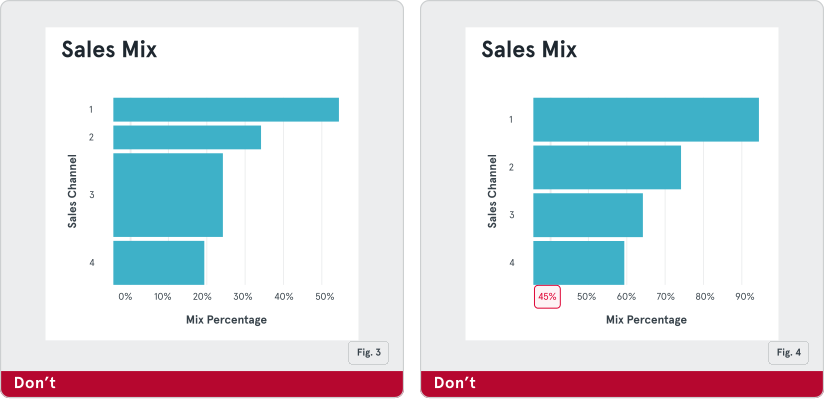
Fig. 3: Do not use bars of different widths, or space them unevenly
Fig. 4: Do not start your axis at a non-zero baseline. Doing this can misrepresent your data.